Using Library Resources
Western Sydney University Library e-resources can be used in class, embedded (or linked) into Ultra and can be used within other online tools.
To add Western Sydney University Library resources such as e-books, journal articles or streaming online video into your teaching materials, you must create stable links that work both on and off-campus. URLs from the location bar in your browser will generally not work consistently.
Many e-resources have options to create stable links - some terms used include 'Permalink', 'Bookmark URL', ‘Embed/Link’, ‘Stable URL' and 'Digital Object Identifier' (DOI).
Create a link to a record in the Library Search Box
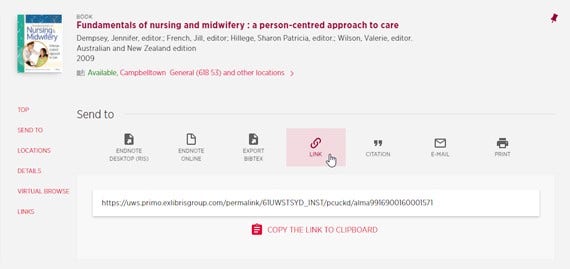
Use this method to create links to records in the Library Search box e.g. e-books, print material and videos
1. Perform your search via the Library search box.

2. Click on the record and select the link icon .
Other link generators
If you experience any issues creating links, please contact the Library Learning Hub for assistance.